Denge

PERSONAL SPENDING TRACKER · iOS & ANDROID

Know your money.
Find your balance.

Your daily spending, your budgets, and the bigger picture. All in one place. A little less on your mind.

Start free. Go Plus when you need more.

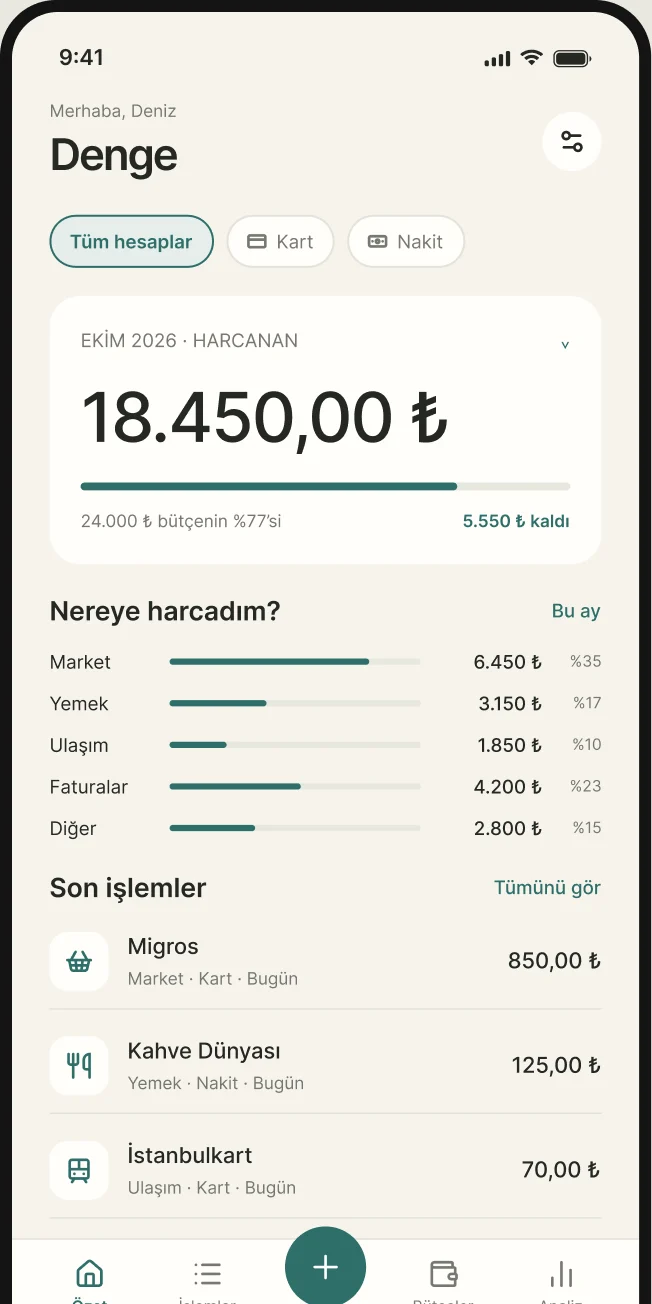
ONE MONTH. A CLEARER PICTURE.Denge home screen: October spending total, budget progress, spending by category and recent transactions (sample data)
Inside Denge · October 2026TRY · ₺

LESS GUESSWORK

Not another spreadsheet.
A little balance for everyday life.

  1. 01See

    Card or cash. Know where every expense belongs.

  2. 02Plan

    Find your limits with monthly and category budgets.

  3. 03Understand

    Take a calmer look at what changes month to month.

01 / SPENDING

Small expenses.
One clear total.

From groceries to your afternoon coffee, keep everyday expenses together. See when, where, and from which account you spent.

  • Track card and cash spending together.
  • Search by transaction or category; filter by account.

18.450,00 ₺

Example: the total of 42 transactions in October.
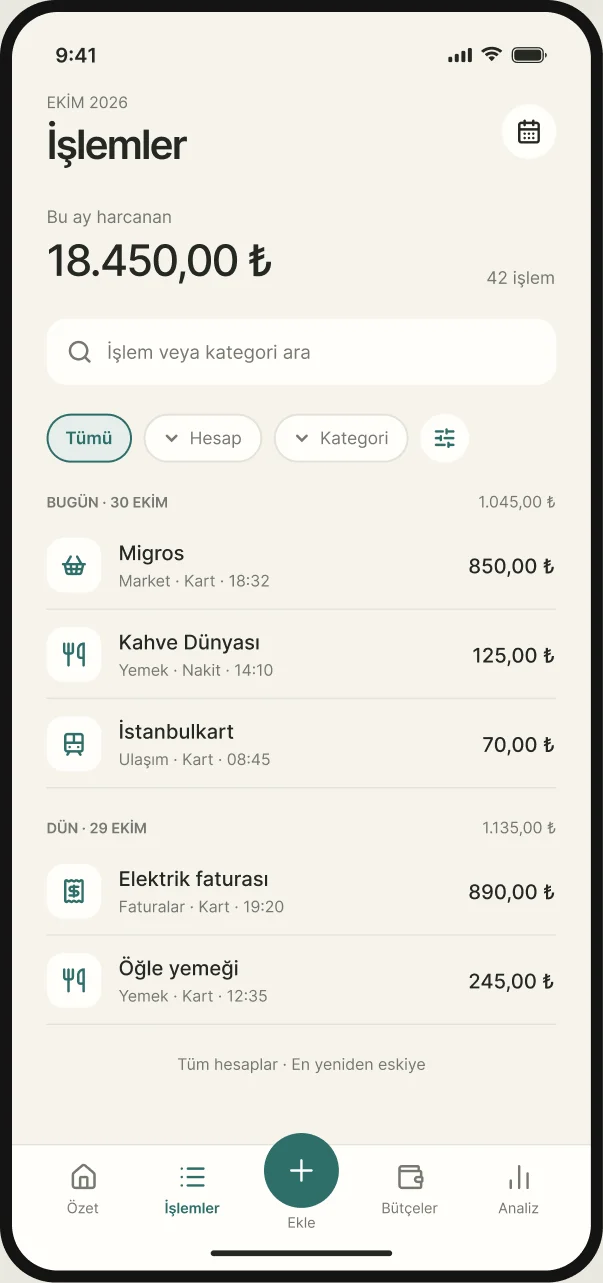
Denge transactions screen: this month's total, search, filters and a list of expenses (sample data)
An actual app view · Sample data

02 / BUDGETS

Know your limits.
And what’s left.

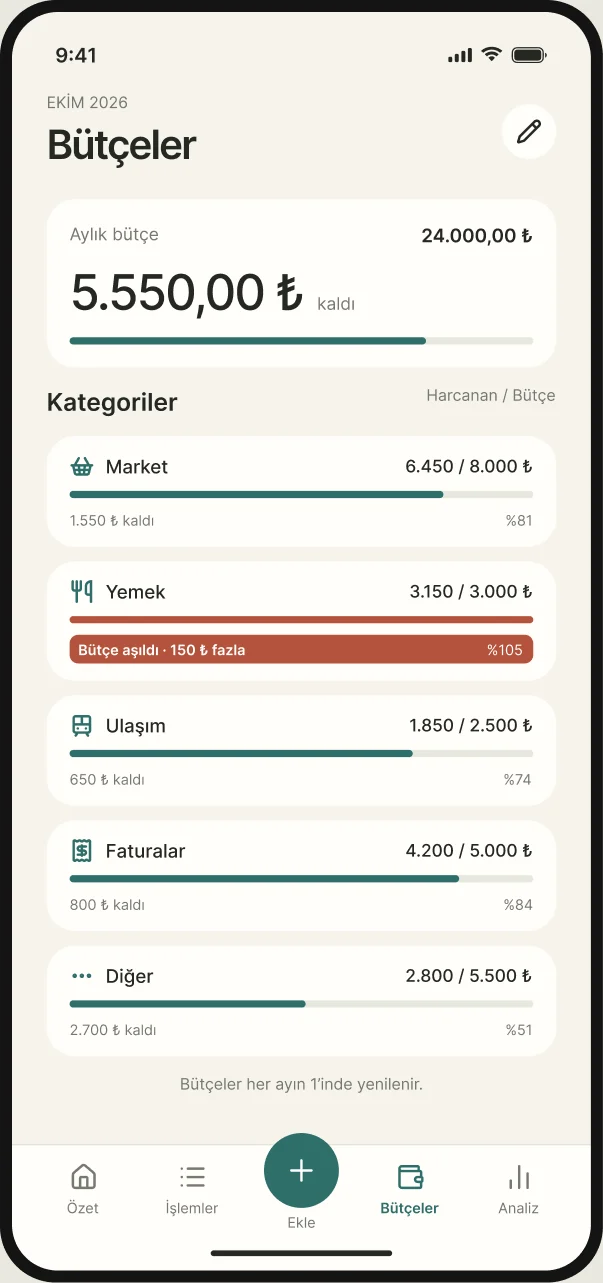
Set a monthly budget and make room for each category. Denge puts spent and remaining amounts side by side. If you go over, it’s clear.

  • Compare spending with the budget for each category.
  • Dining: 3.150 / 3.000 ₺ · 150 ₺ over budget.
  • Budgets reset on the first of each month.

5.550,00 ₺

Example: remaining from a 24.000 ₺ monthly budget.

Denge budgets screen: monthly budget remaining and spent against budget for each category (sample data)
An actual app view · Sample data

03 / INSIGHTS

See this month.
Understand the shift.

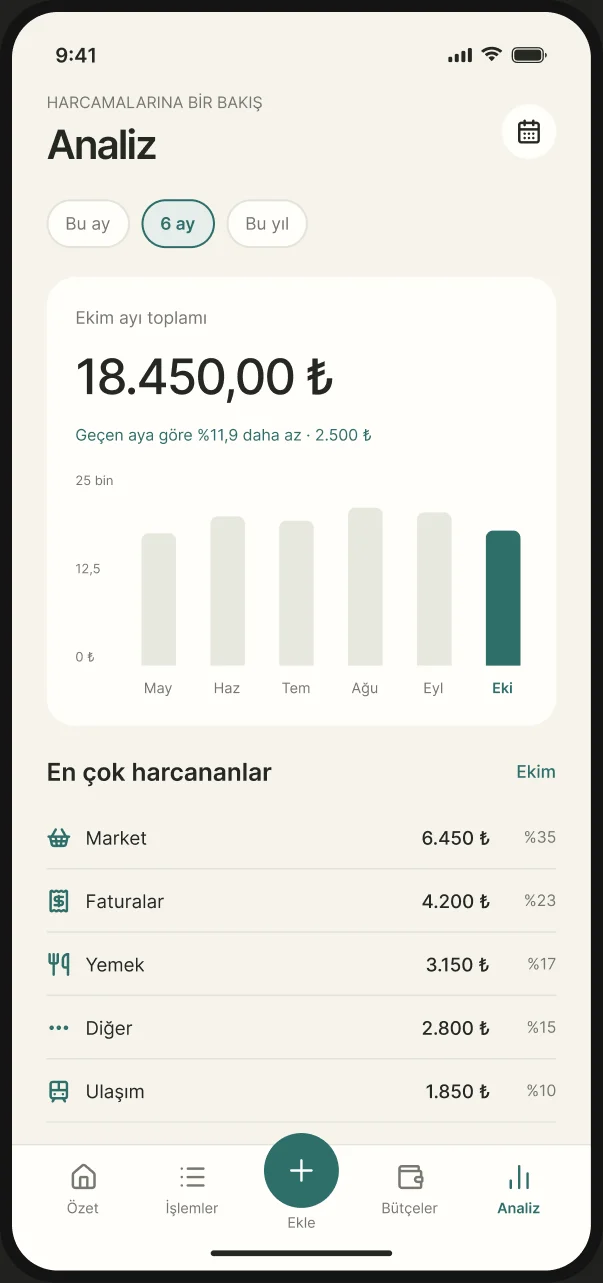
Look beyond a single total with a six-month view. Compare monthly spending and see which categories account for the most.

  • Monthly totals and change from the previous month.
  • Category amounts and their share of total spending.

11.9%

Example: lower spending in October than the month before. Not a forecast or a promise of savings.

Denge insights screen: six months of spending as a bar chart and the top categories (sample data)
An actual app view · Sample data

04 / QUICK ADD

Amount. Category.
Done.

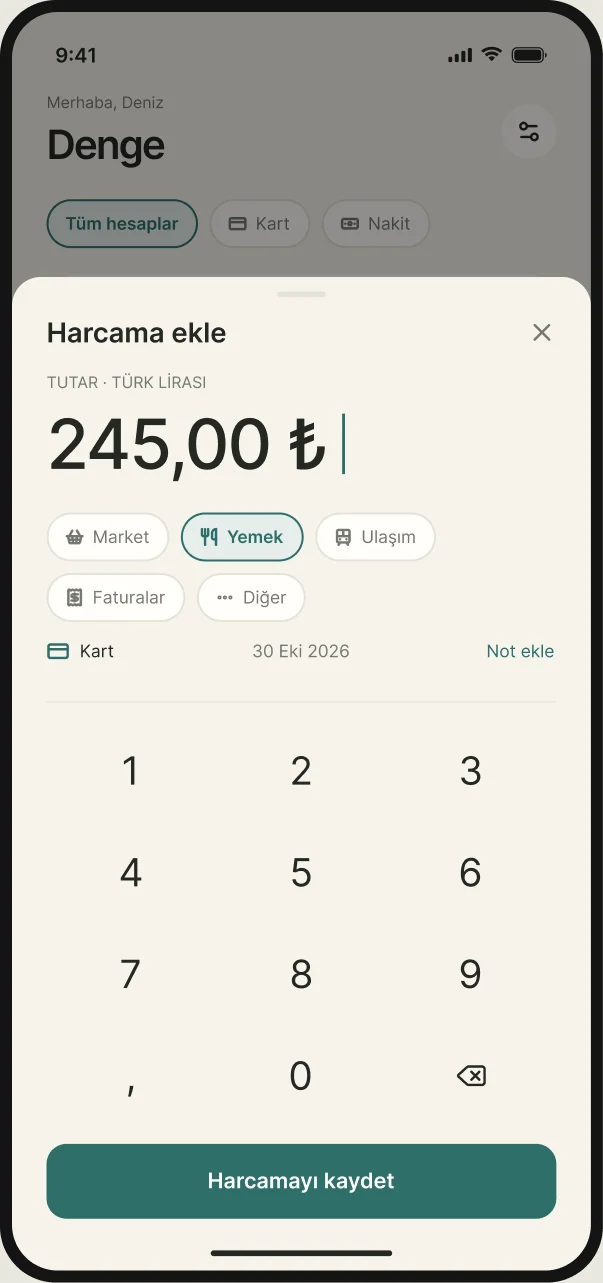
Add an expense while it’s fresh in your mind. A clear amount, generous keys, and just enough detail. A daily habit that stays out of your way.

  • Enter the amount, choose a category and account.
  • Set the date and add a note if you like.
  • Save your expense and get on with your day.

245,00 ₺

Example: keeping a record of lunch can be this simple.

Denge add expense sheet: an amount, category chips, account and date, and a number pad (sample data)
An actual app view · Sample data

YOUR KIND OF BALANCE

Start simple.
Go deeper when you’re ready.

Denge for your daily routine. Denge Plus for a deeper view.

Denge

0 ₺

Start tracking your day for free.


  • Unlimited history and budgets
  • 2 accounts, 1 device, 2 active installment purchases
  • Transfers, card statements and due-date reminders
Download free

Denge Plus7 DAYS FREE

599,99 ₺/ year

About 50 ₺ per month · Save 29%

Prefer monthly? 69,99 ₺ / month


  • Unlimited accounts and active installment purchases
  • All your devices at once
  • Foreign currencies at central bank rates, CSV export and a reminder for every installment
Try 7 days free

7 days free; then 599,99 ₺/year or 69,99 ₺/month, depending on your selected plan. Renews automatically. To avoid a charge, cancel in your store settings at least 24 hours before the trial ends.

FAQ

A few things
to know.

Can I use Denge for free?

Yes. The free plan includes unlimited history and budgets, 2 accounts, 1 device and 2 active installment purchases. Denge Plus removes these limits and adds foreign currencies, CSV export and a reminder for every installment.

How do I add an expense?

Enter the amount, choose a category and account, then save. You can also set the date and add a note.

How can I sign in?

Continue with Apple, Google, or a one-time code sent to your email.

Which currencies can I use?

Everything is recorded in your default currency; in Turkey that’s the Turkish lira (TRY). With Denge Plus you can also add accounts and entries in foreign currencies: that day’s central bank rate is filled in (the Central Bank of Turkey, TCMB, or the European Central Bank, ECB, for currencies TCMB doesn’t publish), or you can type your own.

What happens after the Plus trial?

Your chosen yearly or monthly plan renews automatically. To avoid a charge, cancel in your store settings at least 24 hours before the trial ends.

BEGIN WITH TODAY

Small steps.
A little more balance.

Record your first expense. See the rest more clearly.